
VocAlign Pro 6: Automatic Vocal Alignment for Harmonies, Overdubs, and ADR
VocAlign Pro 6 from Synchro Arts automatically matches the timing and pitch of any overdub or backing vocal to a guide track, eliminating the manual editing that stacked harmonies and multi-take recordings demand. Learn how ARA2 integration, timing alignment, and pitch alignment modes work together in a modern production workflow.
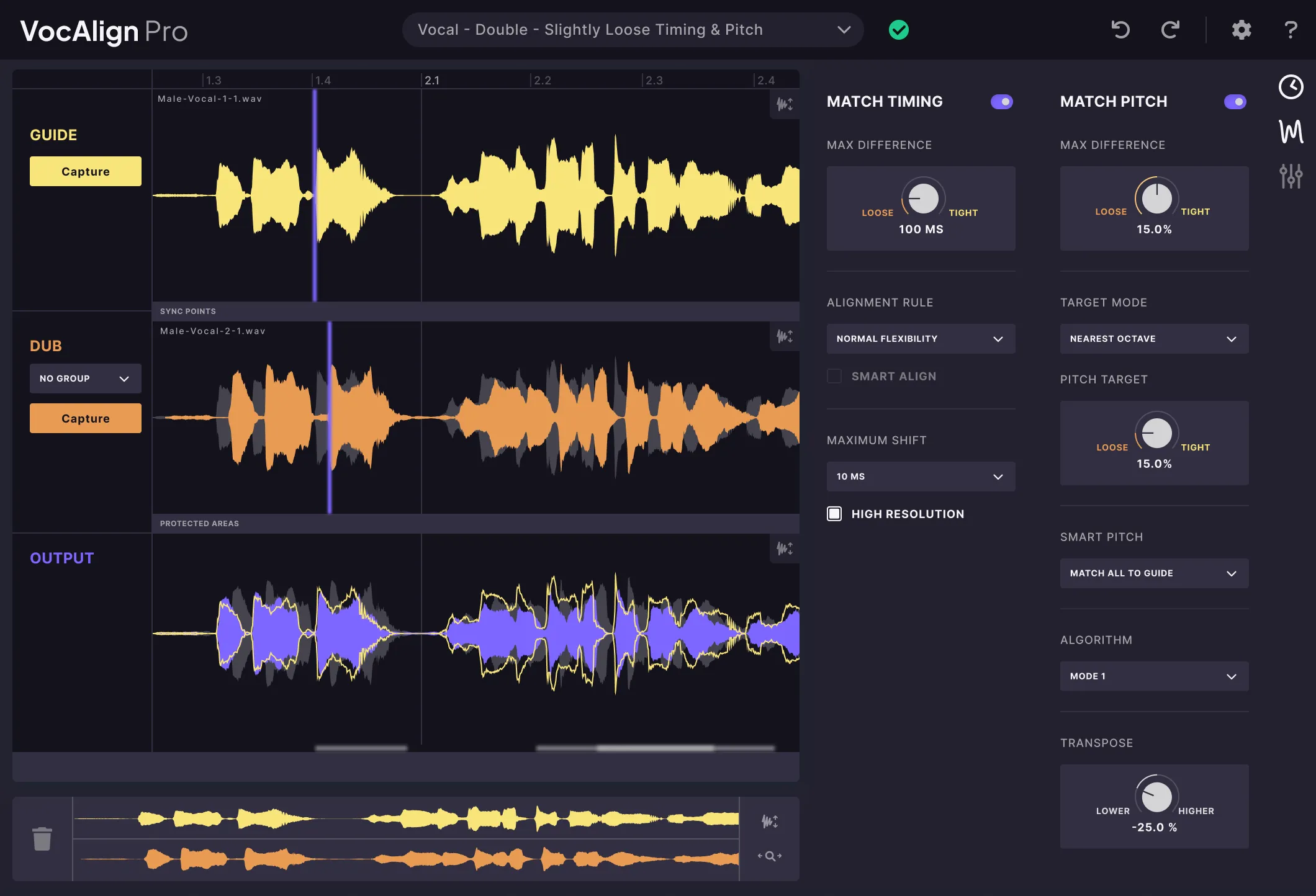
VocAlign Pro 6 from Synchro Arts solves one of the most time-consuming problems in vocal production: the natural drift and timing inconsistencies that occur whenever a singer records multiple takes of the same part. Even a skilled vocalist performing the same phrase twice will land consonants a few milliseconds apart, sustain vowels at slightly different lengths, and trail off with subtly different timing at the end of phrases. When you stack these takes as harmonies or doubles, the result is a blurry, unfocused sound that no amount of level adjustment or compression will fix. VocAlign Pro 6 analyzes a guide vocal and a dub, calculates the timing and pitch differences between them, and warps the dub to match the guide automatically, turning hours of manual editing into a process that takes seconds.
The plugin goes beyond simple time-stretching. Its alignment engine compares the two signals at a phrase-by-phrase and syllable-by-syllable level, identifying where the dub deviates from the guide in time and optionally in pitch, then applies the minimum warp needed to bring them together without introducing unnatural stretching artifacts. The result is a dub that sits inside the guide vocal rather than fighting it, producing the tight, cohesive double-tracking sound that defines professional recordings in pop, R&B, country, and cinematic music. Dubbing engineers working on ADR and localization rely on the same capability to align replacement dialogue to the timing of the original performance without re-recording in a matching acoustic environment.
ARA2 Integration: Working Directly on the Timeline
The most significant workflow change in VocAlign Pro 6 is full ARA2 support. ARA (Audio Random Access), developed by Celemony and PreSonus, allows compatible plugins to access the full audio timeline of a DAW clip rather than receiving audio only in real time. In practical terms, VocAlign Pro 6 can read both the guide and dub audio directly from your session without requiring you to bounce either track, create a send, or use the traditional sidechain routing that older versions demanded.
The ARA2 approach eliminates the main friction point that made vocal alignment feel like a creative interruption. In older routing setups, you had to stop working on the arrangement, set up sidechain sends, play the session in real time to capture the alignment, render the result, and reimport the processed audio. With ARA2, the operation is non-destructive and fully reversible: the original dub audio remains untouched on disk, and alignment data is stored inside the plugin instance — re-open it any time to adjust boundaries or swap the guide track.
- Select the dub clip in your DAW timeline.
- Open VocAlign Pro 6 as an ARA2 extension on that clip.
- Designate the guide track inside the plugin interface.
- The alignment processes immediately — no real-time playback or bouncing required.
ARA2 workflow is supported in Logic Pro, Pro Tools Ultimate, Studio One, and Cubase. In other DAWs, VocAlign Pro 6 falls back to classic sidechain plug-in mode — same alignment quality, but requires real-time capture. Check the Synchro Arts compatibility list before purchasing.Timing Alignment vs. Pitch Alignment Modes
VocAlign Pro 6 offers two distinct alignment modes. Timing alignment is the core function: it warps the dub to match the rhythmic profile of the guide, correcting early and late consonants, mismatched breath lengths, and phrase-level drift without touching the pitch content of the dub. This mode covers double-tracking, harmony stacks with correct pitch but inconsistent timing, and ADR dialogue where the replacement performance must match original lip movement.
Pitch alignment adds a second layer that brings the fundamental pitch of the dub closer to the guide in addition to timing correction. Useful scenarios include a harmony with slight intonation drift across a long sustained note, a double where the singer drifted sharp in a bridge, or a choral arrangement where individual pitch inconsistencies smear the unison. Pitch alignment does not replace a dedicated tool like Melodyne or Auto-Tune for detailed intonation work — it addresses the pitch relationship between guide and dub, not the absolute pitch accuracy of either track.
Who Uses VocAlign Pro 6 and When
Producers working with stacked vocal harmonies are the largest user group. A typical pop or R&B production may have the lead vocal doubled with three or four harmony parts, each sung by a live vocalist. Each performer brings their own micro-timing, and without alignment the stack sounds like a group of people rather than a single cohesive texture. VocAlign Pro 6 brings every harmony part into phase with the lead in timing and optionally pitch, producing the tight, glued sound of professional harmony arrangements.
Dubbing and ADR engineers represent the other major professional use case. Replacement dialogue must match the timing of original lip movement to be credible on screen. VocAlign Pro 6 takes the studio-recorded replacement line as the dub and the original production audio as the guide, aligning the new performance to the mouth movements without manual word-by-word editing. The same workflow applies to localization across an entire film's worth of dialogue.
Session engineers working with bands also find value outside vocal work. Any situation where two recordings of the same part need tight layering benefits from automatic alignment: doubled guitar rhythms, parallel bass takes, stacked string overdubs. The plugin is not limited to vocals by design, and the ARA2 workflow makes it practical to align many clips in a session without becoming slower than manual editing.
Frequently asked questions
Does VocAlign Pro 6 replace pitch correction plugins like Melodyne?
No — they solve different problems. <strong>VocAlign Pro 6</strong> corrects the timing and pitch <em>relationship between two performances</em> (guide vs. dub). <strong>Melodyne</strong> and similar tools correct the absolute pitch accuracy of a single track against a musical scale. Most workflows use both: pitch-correct the lead vocal first, then use VocAlign to align doubles and harmonies to that corrected lead. Running VocAlign on uncorrected material is valid, but the dub will match whatever pitch drift exists in the guide.
Can VocAlign Pro 6 align multiple dubs at the same time?
One dub per plugin instance. For stacked harmonies, open a separate instance on each dub track and point every instance to the same guide. In <code>ARA2</code>-compatible DAWs this is fast — no real-time capture or bouncing: open the extension on each clip, select the guide, and alignment updates immediately. <strong>Revoice Pro</strong>, also from Synchro Arts, offers multi-track alignment and additional processing in a dedicated editor window for larger sessions.
How does VocAlign Pro 6 differ from VocAlign Ultra?
<strong>VocAlign Pro 6</strong> is the current flagship and adds full <code>ARA2</code> support, pitch alignment mode, and more granular control over warp boundaries and alignment sensitivity. VocAlign Ultra is an earlier generation with partial ARA support in some formats, no pitch alignment mode, and fewer phrase-boundary controls. Pro 6 also ships an improved stretch algorithm that handles large timing differences with fewer artifacts — most noticeable when the dub diverges significantly from the guide rather than differing by only a few milliseconds per syllable.
Recommended Related Products
Synchro Arts VocAlign Pro 6
Automatically time-align and pitch-match multiple vocal takes in seconds.